The aim of this article is to present the main actions to maximise the chances of appearing as the first result when a search is performed on the
App Store or the
Play Store.
The process of improving the visibility of a mobile app on stores and its conversion rate for download is called ASO (for App Store Optimisation). ASO is to mobile apps what SEO is to websites.
According to
Apple, 65% of mobile app downloads on the App Store occur directly after a search for it. It is therefore important to work on your visibility on the stores to maximise your downloads.
Here is a list of tips to improve your ASO:
Choose a good name
Choose good keywords
Fill in the description well
Perform A/B testing on the app icon
Upload screenshots and videos of the app
Adapt content to the user's location
Encourage users to rate and review the app
We will now detail each of these points.
Choose a good name
Keywords in the title have the most significant weight in ranking. The title should be:
relevant to the app's concept
easy to read
unique
be a maximum of 50 characters on the Play Store
be a maximum of 30 characters on the App Store
potentially contain keywords

Examples of app titles with keywords.
Choose good keywords
Keywords are words that users will type to find your app. They should be included in the title, subtitle, the "keywords" field (only on the App Store) and in the app's description.
To find the right keywords, ask yourself the following questions:
What are the main features of my app?
What are the synonyms that describe these features?
What are similar apps called?
What is the app's category?
What terms do people generally use in this category?
The tool
AppRadar allows for the analysis of keyword relevance.
Fill in the description well
The description must be:
informative
easy to understand
clearly structured (bullet points, emojis)
contain keywords (only for the Play Store)
be a maximum of 4000 characters
The Play Store uses the words present in the description to index the app, which is not the case for the App Store. Keywords must appear naturally in the description.
Perform A/B testing on the app icon
The idea is to design several versions of your icon and see which one maximises the download rate.
For this, you can use an A/B testing tool like
SplitMetrics.
Upload screenshots and videos of the app
Screenshots and videos do not have a direct impact on ranking, but they influence the conversion rate, which is one of the ranking criteria.
The objective is to present the app's main functionalities to the user, showing them the most attractive screens.
Here are some examples of presentations:
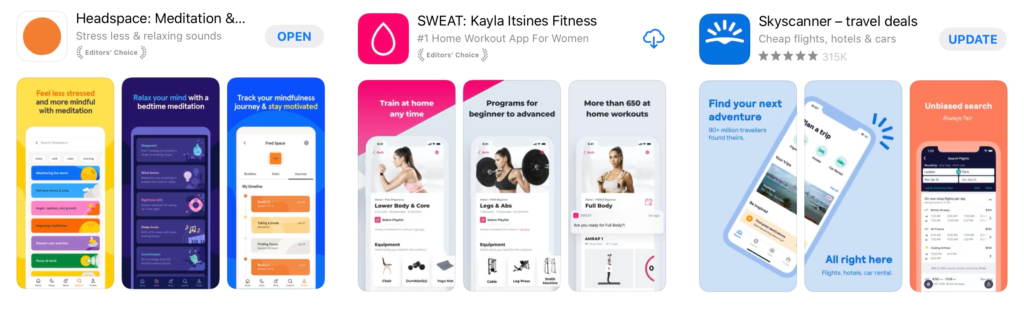
For SWEAT and Skyscanner, the three images form part of a coherent set.
Adapt content to localisation
The App Store is available in over 175 countries and 40 languages.
It is possible to adapt textual, image, and video content to each country and language. More information on this topic is available in
this article (in English).

Example of Facetune 2 app presentation in China and Russia. The screenshots change so that the user can identify with the people.
Encourage users to rate and review the app
The number of ratings, comments, and the average rating are ranking criteria on the stores.
To obtain more ratings, you can ask users to rate the app during its use. On the App Store, the rule is to request a rating a maximum of 3 times per year. It is advisable to mainly ask for ratings from users who have used the app extensively.
Do not hesitate to respond quickly to all user comments on the stores and to resolve any issues they encounter with the app.
Conclusion
ASO is a process that we advise you to integrate into your marketing strategy and which can have a significant impact on the activity volume of your mobile app.
If you are interested in these topics, you can take a look at
this article on the launch strategy of a mobile app.
Note: a significant part of this article draws its inspiration from this article fromAppRadar (in English)