What is an A/B test?
Definition
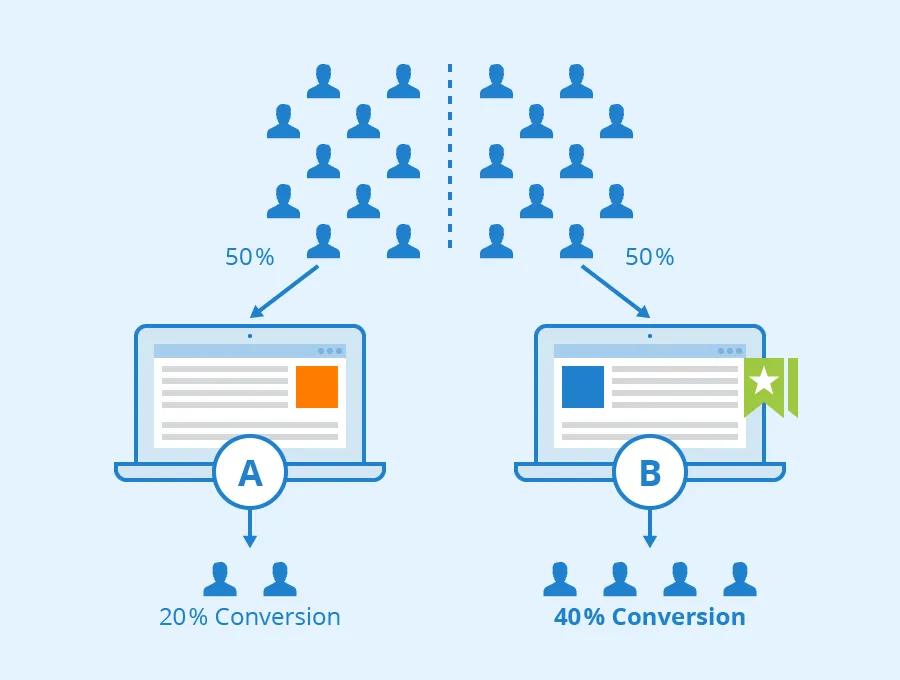
A/B testing is a marketing analysis method used to evaluate different versions of web pages, emails, or social media posts. Its main purpose is to determine which version achieves the best results (traffic, visitor action rate, revenue generated by a page).
Specifically, two presentations are created and shown to distinct groups of users, and then the performance of each group is analysed. User allocation to a group and performance analysis are carried out using the tool employed.
Why launch an A/B test?
Increase conversion by removing friction in your customer journey.
Get to know your users better, their needs, and their expectations.
Accumulate reliable data to make reasoned strategic decisions.
Increase your return on investment (ROI) by optimising the vital parts of your product.
The different types of A/B test
Here are the main types of A/B tests, to be adapted according to your needs:
Split Testing
Here, two distinct versions of the tested product are presented to an equal panel of users. This 50/50 distribution facilitates the comparison of conversion rates or the number of clicks on specific elements. It is ideal for evaluating new versions of websites, design or logo changes, as well as form proposals for existing clients or company prospects.
Multivariate Test (MVT)
This test allows for combine an unlimited number of elements on a single page (text phrasing, button colour, layout of interface elements, …) and analyse the best-performing combination. High traffic is a prerequisite for the successful execution of this test.
Test A/A
During an A/B test, one or more variations of a website are generated. Each visitor to the page is directed to one of the versions. The main objective of the A/A test is to ensure that the process of allocating visitors to the different variations is fair and that the results of the A/B test are reliable. In theory, the two identical versions should produce similar results. If significant differences are observed between the two identical versions, this could indicate problems in the test implementation, such as selection bias or technical errors.
Multi-Page Test
The multi-page test focuses on several elements modified across multiple distinct pages, exploring entire sales or conversion funnels.
Imagine an e-commerce website that sells clothes online. Its objective is to improve the conversion rate throughout the purchase funnel. Here's a concrete example of a multi-page test:
Homepage: The variant could test different layouts, highlighting promotions, new arrivals, or best-sellers.
Category Page:
Variant 1: Display products by list with visible filters.
Variant 2: Display products as a grid with fewer visible filters.
Basket Page:
Variant 1: Simplify the layout, removing distractions and highlighting the payment button.
Variant 2: Offer express payment options with third-party providers (such as PayPal or Apple Pay).
Launching and operation of tests
Test Preparation
To succeed in an A/B testing campaign, the company must have a varied range of assets, such as web pages, emails, landing pages, or newsletters. Each asset must have a specific objective defined before going live to allow for precise measurements and ensure the campaign's effectiveness.
How Tests Work
As already mentioned, A/B testing allows you to compare the current version of an element on your page with one or more alternative variants.
Your audience is thus randomly exposed to the different variants being tested, until the best-performing variant for your specific objectives (engagement, clicks, add to basket, etc.) is identified.
Setting up a Strategy
To conduct a successful testing phase, it is necessary to establish a clear strategy beforehand. Here are some key steps:
Define precise objectives (conversion improvement, retention increase, etc.)
Conduct an audit to identify the site's strengths and weaknesses. For example, you can use tools such as Google Analytics to understand the site's current performance and analyse friction points on your product.
Develop optimisation scenarios based on findings and identified opportunities.
Build a roadmap by defining priorities and the types of tests to be carried out.
Execute the tests according to the established plan and start taking measurements.
Analyse the results of the A/B tests while continuing experiments.
Communicate the results to the relevant teams for analysis and decision-making.
Visitor Allocation Mechanisms specific to A/B testing
Visitor Segmentation
This mechanism needs to be set up before the test launch and depends on the targeted client verticals. It involves the categorisation of visitors into homogeneous groups based on specific characteristics such as behaviour, demographics, or other relevant variables.
This allows the A/B test to determine the impact that a particular component can have within a given user population.
Bandit Test (Multi Armed Bandit)
The Bandit test is a dynamic approach that adaptively adjusts traffic redirection based on observed performance over time.
In practice, the more promising a presentation appears, the more site traffic will be directed towards it, thus maximising the effectiveness of the test over time.
Client-Side/Server-Side Methods: which to choose?
Client-Side Vs Server-Side
There are two distinct technical approaches to implementing an A/B test. The tool used often determines which approach to adopt:
The client-side approach is particularly suitable for marketing teams responsible for conversion optimisation. Variations are applied directly in the user's browser, without server-side intervention. This allows for quick implementation, great flexibility, and ideal responsiveness for tests requiring frequent modifications. For example, a client-side test might involve changing the colour of a call-to-action button or testing different images on a product page.
The server-side approach, for its part, is suitable for technical teams who prefer to work directly from their development environment and carry out experiments on applications. Modifications are made directly on the server-side, which allows for more complex tests requiring substantial changes to the backend. For example, a server-side test could involve changes in the payment process, such as the introduction of a new delivery method or the calculation of shipping costs based on different criteria.
The Hybrid Method
For some businesses, a hybrid approach combining both methods can be the ideal solution. This offers the flexibility and responsiveness of the client-side, while maintaining rigorous control on the server-side for security and confidentiality-sensitive aspects.
Success and Error Avoidance
Keys to a Successful A/B Test
Common Errors to Avoid
Neglecting 'quick wins' in favour of large-scale tests.
Not taking user feedback into account before launching tests.
Selecting the wrong KPIs to optimise.
Testing too many parameters at once.
Not knowing when to stop a test's duration.
Conclusion
Determining When to Stop a Test
Obtaining reliable indicators during an A/B test takes time. Usually, a decision to make a change is taken with a statistical confidence level of at least 95%. Stopping the test also depends on the size of the visitor sample, which must be large enough for relevant analysis: as soon as results show little or no variation, it can be estimated that the maximum conversion rate for the given period has been reached.
It is also crucial to avoid basing the testing phase on an incomplete sales cycle, which could skew the results. It is therefore recommended to maintain it over one to two sales cycles.
Essential A/B Testing Tools
Let's conclude this A/B testing guide by examining the various tools available.
Upflowy is a no-code drag & drop tool that allows you to design and optimise web experiences. The tool's editor is accessible without technical skills and provides access to numerous elements (A/B test, form creation, conditional logic). The software connects to over 3000 applications via its API.
49$ / month for 3 users + 5 web experience designs, free version for 1 user + 3 web experience designs. Kameleoon is a leading paid tool for in-depth exploration of A/B test quality. All visitor data is collected and analysed by the platform, allowing for effective profile segmentation. Kameleoon integrates with numerous data tools (Google Analytics, Salesforce, MailJet, Hotjar, …).
No free version, free demo available, prices on request. AB Tasty targets medium-sized businesses, providing comprehensive engagement rate measurement and in-depth website traffic analysis. With real-time results and advanced features such as behavioural targeting and multivariate testing, it's the ideal tool to improve your user experience. Integrates with over 80 tools (Segment, Amplitude, Salesforce, …).
No free version, no free trial, prices on request. Hub CMS offers testing and analysis features for websites, CTA buttons, forms, and emails. Easy to use, this tool is a good entry point for businesses looking to use a website to generate leads.
No free version, no free trial, prices on request. Proof is a user experience personalisation solution that allows you to modify the display of your website pages according to the visitor's profile. An editor enables effective page personalisation without needing to touch the code. It is compatible with Google Analytics.
From 599$ / month.