Introduction
Picture the scene: you launch a CLI tool to diagnose a server in production. It displays information about a suspicious process... then, without you really understanding why, your screen flickers, lines disappear, and a prompt appears: "Session expired. Please re-enter your token:"
You obey (by reflex), you paste a secret, and you've just given it... to an illusion. Not malware, not a dodgy binary: just text, enhanced with ANSI escape sequences interpreted by your terminal emulator.
This is precisely what makes ANSI escape sequences so treacherous: we tend to regard terminal output as display, whereas it is also a control language. If an attacker manages to inject these sequences into a string that will be printed (service name, process command, environment variable, logs...), they can manipulate what you see, lead you into error, and sometimes even interact with the clipboard.
We spotted the same issue in the open-source tool
witr, and we've opened a (
PR on GitHub), to fix it.
What are ANSI sequences?
ANSI sequences (or "ANSI escape sequences") are character strings that generally start with the ESC character (Escape, 0x1B, often written \\\\x1b) and which tell the terminal: "don't treat this as text, treat this as an instruction".
They are used for many useful and legitimate things:
To colour text (red, green, bold, etc.)
To move the cursor
To erase a line, the screen, or parts of the display
To modify states (e.g., "alternative screen" mode), window titles, etc.
The best-known form is the CSI sequence (Control Sequence Introducer) which looks like:
ESC + [ + parameters + command letter
When represented as a string, you will often see \\\\x1b[ ... m (the m being typical of styles/colours)
Simple example: setting text to red then returning to normal style:
\\\\x1b[31m → red
\\\\x1b[0m → reset
Example with a colour change
Display control
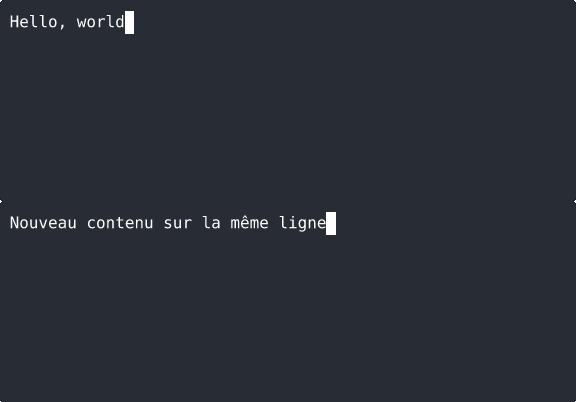
Some sequences allow erasing a line or repositioning the cursor (widely used by progress bars). This is handy... and exactly the kind of mechanism that becomes dangerous if the displayed string is controlled by a third party.
The security risk
A terminal vulnerability related to ANSI sequences doesn't necessarily allow for remote code execution that works every time. Most often, it's a manipulation attack: what the user sees is no longer reality. And in DevSecOps, seeing incorrectly is often enough to make a bad decision.
Here are the most common scenarios.
1) Visual spoofing: fake prompts, fake errors, fake validations
If a CLI tool prints untrusted values (e.g., process name, arguments, env vars, fields from an API), an attacker can inject sequences to:
hide a warning,
erase a line troublesome for the attacker,
move the cursor and rewrite an output,
produce a display that looks like a system prompt.
The trap: the user believes they are interacting with a legitimate request (sudo, token, login...), when it's just an illusion printed by a programme. And humans are very tolerant parsers.
This type of issue has been observed on a large scale in the K8s/OpenShift ecosystem: the injection of ANSI sequences into fields displayed in the terminal has been documented (particularly around the
CVE-2021-25743) in research on the abuse of terminal emulators.
2) Log poisoning: when your logs become a weapon
When we talk about terminal-related attacks, we almost always imagine a compromised SSH scenario, with an attacker directly facing us. But the most insidious vector is logging:
application logs displayed in console,
CI/CD logs,
observability logs,
traces printed in dashboards that end up... copied/pasted into a terminal.
A recent and very concrete example: the
CVE-2025-58160 in
tracing-subscriber (Rust). Untrusted inputs could inject ANSI sequences into the terminal output via the logs, allowing the display to be manipulated (titles, erasure, etc.) and deceiving the operator.
3) Clipboard, titles, clickable links: the 'delayed' attack
Certain families of sequences (especially around what's called "OSC" in many terminals) allow interaction with 'OS-like' functionalities:
A recent case study to be aware of: Apache Tomcat did not escape ANSI sequences in certain log messages. If Tomcat was running in a console (especially on Windows with ANSI support), an attacker could inject sequences via a specially crafted URL to manipulate the console and the clipboard, and attempt to trick an admin into executing a command controlled by the attacker (social engineering type attack).
4) Why is this so frequent in CLIs?
Because CLI tools display information provided by the operating system or by other processes, a portion of which can be controlled or influenced by an attacker.
command lines (argv) of processes,
environment variables,
service names,
fields from APIs (K8s, cloud, orchestrators),
file names (sometimes controllable),
log messages (often controllable).
In the PR we opened, we summarise the problem: "user-controlled / system-derived" strings can contain control characters, including ANSI escapes, and printing them as-is can alter the display, erase information, or impact the clipboard.
witr, what is it?
witr ("Why is this running?") is a diagnostic-oriented CLI tool: it serves to explain why a process/service exists and what chain of causality (systemd, container, shell, cron, etc.) keeps it alive, with a 'narrative' and readable output.
In practice, witr aggregates and displays system information: process command line, parent/child relationships and execution context, with the aim of giving the system administrator a comprehensible view of a service's origin, without having to manually cross-reference multiple commands (ps, systemctl, docker, etc.).
The identified problem
The core of the issue: witr prints a lot of system-derived data (process command lines, env vars, service names...). However, this data can be influenced by a local attacker (or by a supply chain / malicious job / compromised container), and contain ANSI sequences.
The remediation strategy
The fix is not based on a simple patch, but on an architectural choice for the display side, which warrants a slight technical detour.
Rather than hoping that each fmt.Printf(...) is correctly 'sanitised' by each future maintainer, the PR adopts a more sustainable approach: centralising the protection at the write point to the terminal.
The idea is simple but foundational: introduce a 'safe' writer that systematically sanitises everything written to standard output, and only allow ANSI sequences when they are explicitly declared as trustworthy (e.g., colours voluntarily added by the tool).
In the codebase, this solution is implemented with 3 building blocks:
a SafeTerminalWriter which implements io.Writer and neutralises dangerous control characters,
a wrapper Printer around printing functions to avoid direct use of fmt.Print*
and an 'escape hatch' mechanism (via a type ansiString) for ANSI sequences controlled by the application (like colours).
The technical solution
Objective: prevent an untrustworthy string from being interpreted as a terminal instruction.
There are two complementary approaches:
Neutralise / escape control characters (including ESC)
Only allow ANSI via a trusted channel (e.g., an internal colouring function)
Before / After (simplified example)
Before: direct printing of a system-derived string
fmt.Fprintf(os.Stdout, "Command: %s\\\\n", cmdline)
After: centralised sanitisation
func SanitizeForTerminal(s string) string {
out := make([]rune, 0, len(s))
for _, r := range s {
if r == '\\\\n' || r == '\\\\t' {
out = append(out, r)
continue
}
if r < 0x20 || r == 0x7f {
out = append(out, '\\\\x1b')
continue
}
out = append(out, r)
}
return string(out)
}
fmt.Fprintf(os.Stdout, "Command: %s\\\\n", SanitizeForTerminal(cmdline))
The preceding examples illustrate the principle, but they remain deliberately simplified.
In a real CLI, used in production and expected to evolve, the protection against ANSI sequences must be more refined and systematic
specifically filter ESC (0x1b) and certain sequences,
recognise and escape the main ANSI sequences (CSI, OSC, etc.)
and above all, wrap the writing to the terminal in a dedicated component (via a safe writer), so that a temporary oversight does not reintroduce the vulnerability.
Regarding ecosystems, there are useful libraries:
JS/TS: detection/filtering via libs like ansi-regex, suppression via strip-ansi, controlled generation via ansi-escapes
Python: sanitation via re + allowlist, or output wrappers
Go: rune mapping + writers (io.Writer) secure
Best practices and conclusion
If there was only one point to remember, it's that a terminal's output is an integral part of a CLI tool's attack surface. Any data displayed without control, whether it comes from a user, a service, or the system, must be treated as untrustworthy.