Back
Tech 5 min read - 15 May 22 - Mayeul Le Monies de Sagazan

Efficiently finding the origin of a bug with git bisect

Do you want to quickly find the commit that introduced a bug into your codebase but you have several hundred, or thousands of commits? git bisect is probably the tool you need.

The theory

In English, bisect means "Cut in half", and that's exactly what git bisect does:
  • you give it a "good" commit, i.e. a commit where the bug was not yet present;
  • then, you give it a "bad" commit (often the current commit);
  • finally, as long as git bisect finds several commits between the "good" and the "bad" commit, it takes the commit between the two and asks us if that commit is okay.
The advantage of using a binary search is that we know how many steps it will take at most to find the commit that introduced the bug, and that this number of steps only increases by 1 each time our number of suspect commits doubles.
For example, the Linux code contains more than 1 million commits, yet it would take a maximum of only 20 steps (binary logarithm of 1,000,000) to find the commit that introduces a bug!
So much for the theory; now let's see how to use this tool in practice.

The practice

To demonstrate the use of git bisect, we are going to use this git repository (which contains a bug).
We're going to start by downloading the code:
git clone https://github.com/mle-moni/bisect-test
The test.js file contains this code:
// numbers is an array of numbers
function getNumber(numbers, index) {
    if (!numbers[index]) {
        throw new Error('no number for this index')
    }
    return numbers[index]
}
const numbers = [ 42, -121, 4235, 0 ]
const index = process.argv[2]
console.log(`number is ${getNumber(numbers,index)}`)
The following command will allow us to know whether the commit contains the bug or not:
node test.js 3
(we will consider the commit as bad if this command returns an error)
Now let's see which commits have been made:
# montre la liste des commits avec leur auteur du plus ancien au plus récent
git shortlog
LE MONIES DE SAGAZAN Mayeul (28):
      no bug here
      no bug here too
      no bug here too
      no bug here too
      no bug here too
      no bug here too
      no bug here too
      no bug here too
      no bug here too
      no bug here too
      bug introduction
      we still don't know that there is a bug
      we still don't know that there is a bug
      we still don't know that there is a bug
      we still don't know that there is a bug
      we still don't know that there is a bug
      we still don't know that there is a bug
      we still don't know that there is a bug
      we still don't know that there is a bug
      we still don't know that there is a bug
      we still don't know that there is a bug
      we still don't know that there is a bug
      we still don't know that there is a bug
      we still don't know that there is a bug
      we still don't know that there is a bug
      we still don't know that there is a bug
      we just discovered that there is a bug
      Create README.md
Our goal will be, with git bisect, to find that the faulty commit is indeed the one named "bug introduction".
Let's go!
git bisect start
# on choisit un commit où il n'y avait pas le bug (ici, c'est le premier commit du dépôt git)
git bisect good 0f436453aac33b7d39f04be33b909097b34def10
# on précise que le commit actuel est mauvais
git bisect bad
The tool then moves us to the commit between the good and the bad:
Bisecting: 13 revisions left to test after this (roughly 4 steps)
[fb045ac20c5972136afd8c10e510c0483f97b1a9] we still don't know that there is a bug
Then we test the code (here it's easy because it's JavaScript, often we'll have a compilation step):
node test.js 3
Error: no number for this index
This commit contains the bug, so we're going to tell git bisect that the commit is bad:
git bisect bad
Bisecting: 6 revisions left to test after this (roughly 3 steps)
[991ef4bb20a5d29cc6a307dd3a289a5fc3159c3d] no bug here too
Then we continue this routine until we find the bad commit!
node test.js 3
number is 0
git bisect good
Bisecting: 3 revisions left to test after this (roughly 2 steps)
[bc4dd976f1b8e7e79a7109ac074b610dddcf6dd5] no bug here too
node test.js 3
number is 0
git bisect good
Bisecting: 1 revision left to test after this (roughly 1 step)
[f1a089670548b09e2b52737aa05aa25921ee463f] we still don't know that there is a bug
node test.js 3
Error: no number for this index
git bisect bad
Bisecting: 0 revisions left to test after this (roughly 0 steps)
[9d7a3917e0fdfc71be8426f19ccf26b217d0f546] bug introduction
And finally:

node test.js 3
Error: no number for this index 
git bisect bad
9d7a3917e0fdfc71be8426f19ccf26b217d0f546 is the first bad commit
commit 9d7a3917e0fdfc71be8426f19ccf26b217d0f546
Author: LE MONIES DE SAGAZAN Mayeul 
Date:   Sun May 15 14:45:17 2022 +0200
    bug introduction
test.js | 3 +++
1 file changed, 3 insertions(+)
Finally, we can look at what changes caused the bug to appear:
git diff HEAD^
function getNumber(numbers, index) {
+       if (!numbers[index]) {
+               throw new Error('no number for this index')
+       }
        return numbers[index]
 }
Here the "bug" was therefore the condition
if (!numbers[index]) {
since numbers[index] can be 0 and that !0 gives true, it would have been necessary to be more precise and display the error only if numbers[index] was undefined :
if (numbers[index] === undefined) { 

Special cases

If one of the commits cannot be tested (if it doesn't build, for example), there are several solutions:
  • manually choose another commit:
git reset HARD~2 # se placer sur 2 commits avant celui choisi par git bisect
  • let git bisect choose the next commit:
git bisect skip
If you wish to stop the binary search, you can do so simply:
git bisect reset
There you go, that's all for the git bisect tool!

Bonus

If you want to be able to look at diffs with VS Code while still having git tools (rebase, merge, ...) in CLI with vim, it's possible by configuring git difftool.
Here is my ~/.gitconfig configuration, for example
[core]
    editor = vim
[user]
    name = LE MONIES DE SAGAZAN Mayeul
    email = mail@example.com
[diff]
    tool = vscode
[difftool "vscode"]
    cmd = code --wait --diff $LOCAL $REMOTE
Then simply use git difftool in the same way you use git diff:
git difftool HEAD^
Launch 'vscode' [Y/n]? Y
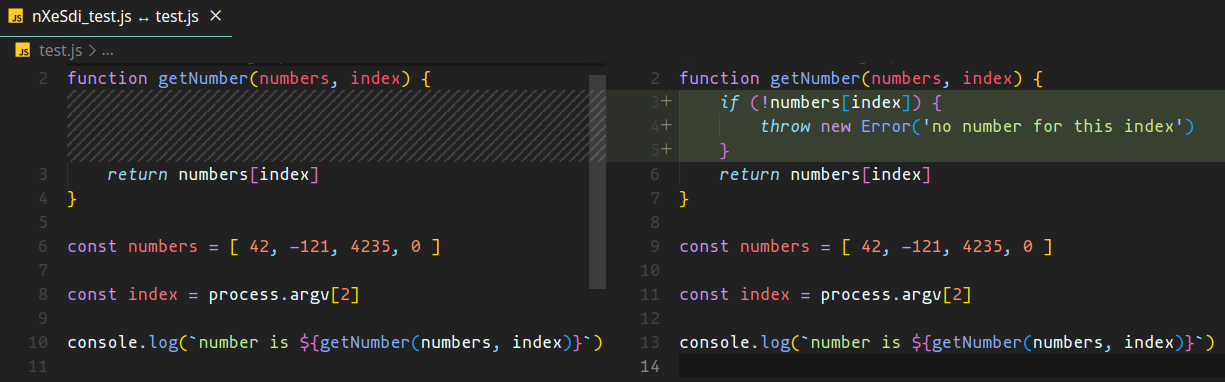
git difftool example

Do you want support to launch your digital project?

Submit your project now