“There are only two hard problems in computer science: naming things, and cache invalidation”. Phil Karlton.
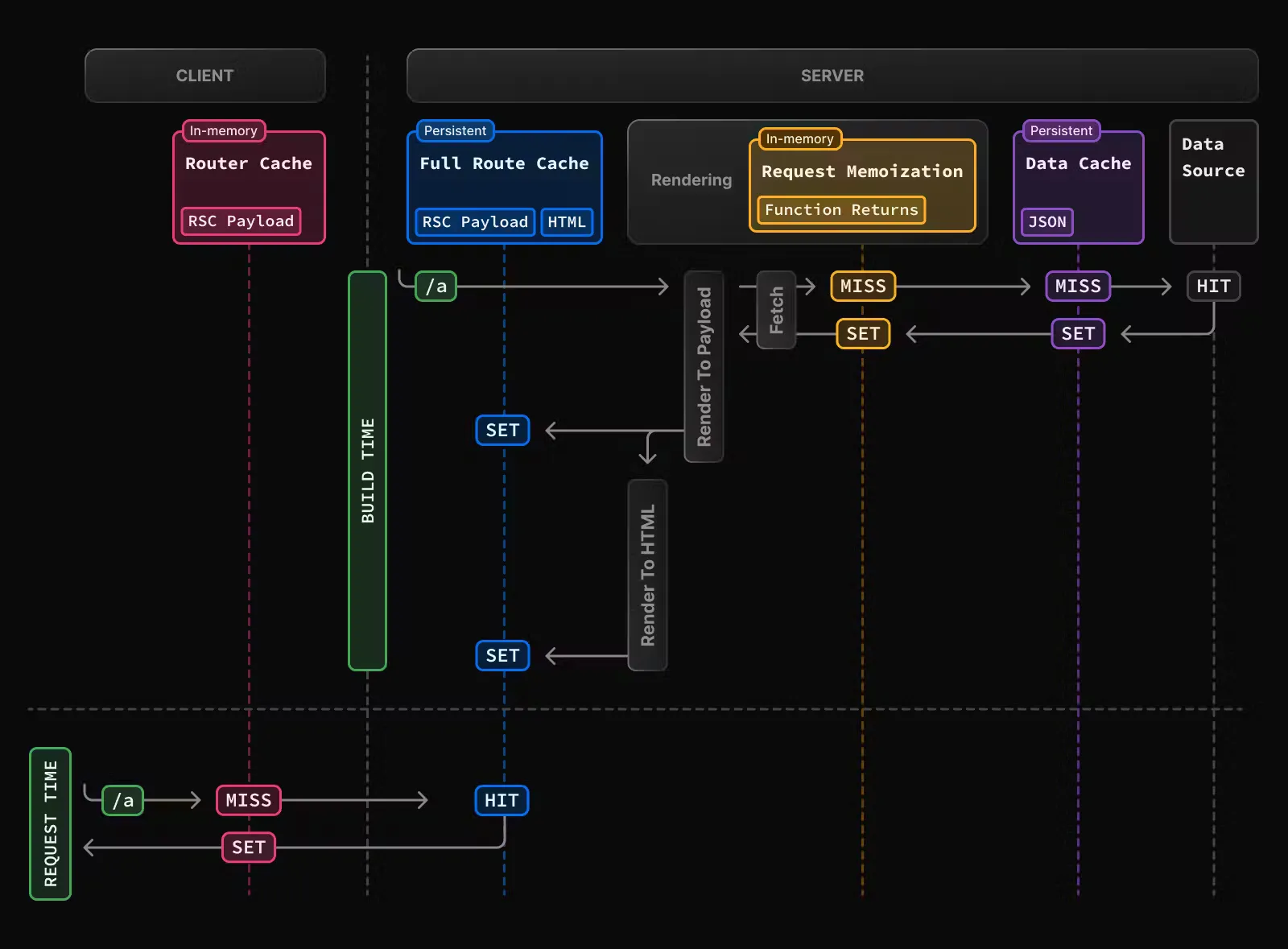
With Next.js 13.4, the App Router has become stable, 6 months after its beta release in Next.js 13. In this new router system, the framework introduces many changes, including React Server Components, to which the React ecosystem is just starting to adapt. To maximise their performance, the framework has pulled out all the stops regarding caching, with no less than 4 different layers. Everything needed to shoot oneself in the foot if one doesn't fully understand how they work.
In addition, in this article I suggest you discover these different types of cache through a concrete example, and learn how to disable them as needed.
In our scenario, we are asked to develop a component that displays an association membership card for a random fictional character. With each page load, the displayed character must be different. In addition to their first and last names, we have the somewhat whimsical request to display their middle-name. We also want to display the year since the character has been a member of the site, their email and phone number. Here's what the membership card would look like:
As the component is not interactive, we decide to make it a Server Component. To obtain random and plausible information about the character, we choose to use the API
randomuser.me.
So we get a first version of the code which is as follows:
import { MemberCard } from "@/components/MemberCard";

const getRandomUser = async () => {
  const res = await fetch(
    "https://randomuser.me/api/?nat=fr&gender=female"
  );
  const { results } = await res.json();
  return results[0];
};

export default async function StaticPage() {
  const subscriptionYear = 1999 + Math.round(Math.random() * 25);
  const user1 = await getRandomUser();
  const user2 = await getRandomUser();
  return (
    <div className="p-6">
      <MemberCard
        firstName={user1.name.first}
        middleName={user2.name.first}
        lastName={user1.name.last}
        email={user1.email}
        phoneNumber={user1.phone}
        profilePictureUrl={user1.picture.large}
        subscriptionYear={subscriptionYear}
      />
    </div>
  );
}
Admittedly, calling the API twice isn't the most efficient, and we could use Promise.all, but we'll keep this code to illustrate our caching issues. We had to generate the registration year with Math.random() as the API doesn't provide this information.
We immediately encounter the first caching layer. In dev on our machine, only the registration year changes when we refresh the page, and worse, when in production, nothing changes when we refresh.
Here's the first thing to bear in mind: the cache behaviour is not at all the same in dev mode as in production mode. The developer can easily be caught out if they only test their code in dev mode and only realise there's a problem in staging or production. To test potential caching issues locally, you need to launch the project with the command `NODE_ENV="production" npm run build && NODE_ENV="production" npm run start`.
This first caching system is called the
Full Route Cache.
By default, our page is static, meaning that Next.js only renders our component/page once: at build time. The result is stored in a static file that is served when the user accesses the page. The API is also only called at build time. This is therefore very efficient; the page is served quickly and without costly operations, but it's not at all what we want in our case.
To disable this behaviour and
make our page dynamic, there are several solutions (
see the docs. Next.js tries to figure out on its own when our page is dynamic. For example, as soon as we access a searchParameter, cookies, or headers, the framework understands that the page must be dynamic and disables the Full Route Cache.
In our case, let's imagine we want to be able to translate our card into different languages. We will therefore read the 'lang' parameter in our page's URL. (e.g., https://ourwebsite.com/member?lang=en). This has the effect of disabling the cache and making our route dynamic.
So we have the following code:
export default async function DynamicPage(props: {
  searchParams: { lang?: string }
}) {
  const lang = props.searchParams["lang"] ?? 'en';
  return <MemberCard lang={lang} ... />
}
Next.js automatically detects when a searchParams property is accessed (probably by using a
Proxy), and disables our cache.
Unfortunately, our generator still isn't working correctly. This time in production, the registration year changes with each reload, proving that the Full Route Cache is indeed disabled and that Next.js is rendering our component, but the character information is still the same.
This comes from another form of cache: the
Data Cache Next.js has actually modified the 'fetch' function on the server side to intercept requests and cache them, using the URL as a key. This cache is enabled by default and persists from one request to another and
even when we rebuild and redeploy our project! This cache can be very powerful but in our case it's inconvenient, so we'd like to disable it.
For this, once again, there are several solutions, documented
here. If you want to disable the cache only on certain requests, you can use the `cache: 'no-store'` or `next.revalidate: 0` parameters of fetch. (Good to know: if you disable the cache on only one of the page's requests, it will automatically become dynamic.) You can also disable the Data Cache on an entire route with `export const dynamic="force-dynamic"`, or `export const revalidate = 0`.
Finally, we can manually invalidate this cache by using the option
fetch's next.tags and revalidateTag. For example, if you use Contentful to write your articles and display them on your Next.js blog, you can use the
Contentful Webhook system in combination with revalidateTag to update your article's Next.js page as soon as you modify it on Contentful.
To return to our case, to disable the Data Cache, we will use the following code:
const getRandomUser = async () => {
const res = await fetch(
"https://randomuser.me/api/?nat=fr&gender=male&test=3",
{
cache: "no-store",
}
);
const { results } = await res.json();
return results[0];
};
We test our code in production and... yes, this time we do get different data with each load! Except strangely, we have the same first name twice in our member card... we are indeed fetching two different users in our code, we should have two different first names...
And yes, there's still another type of cache at play: it's the
Request Memoization. This time it's a feature of React Components and not Next.js. In addition to Next.js's Data Cache, React implements a cache that only lasts for the duration of a request and only applies if a request is made within a Server Component. The first time getRandomUser is called, the randomuser.me API is called with fetch and React caches the result, then the second time React returns the result of the first request, avoiding an often unnecessary request. In our case, this causes a problem and once again the documentation provides us with
a solution to disable this cache. So here's our new code:
const { signal } = new AbortController();
const getRandomUser = async () => {
  const res = await fetch(
    "https://randomuser.me/api/?nat=fr&gender=female&test=2",
    {
      signal,
      cache: "no-store",
    }
  );
  const results = await res.json();
  return results.results[0];
};
Right, this time it's good, every time we reload our page, we do get a different user with the correct data! But we notice a strange little detail: when we go to another page on our site and come back to our random member page, it's the same user as when we left that page. What's going on?
Well, when we change pages properly using the Link component or Next.js's navigate function, we don't really change pages. The framework will just load the Server Component corresponding to the new page and render it, so it simply updates a part of the DOM: this is what's called
soft-navigation.
However, when Next.js loads the page's Server Component, it caches it and reuses this Server Component when we return to the page: this is the
Router Cache.
There isn't really a parameter to disable this type of cache. However, we can manually invalidate it with `useRouter().refresh()` (
note : useRouter from 'next/navigation', not 'next/router') and soon with
server actions.
For example, if we want to add a button to generate a new user, we could use the following client component:
"use client";
import { useRouter } from "next/navigation";

export const RefreshButton = () => {
  const router = useRouter();
  return (
    <button
      className="bg-sky-500 rounded-md text-white active:bg-sky-700 px-3 py-2"
      onClick={() => router.refresh()}
    >
      REFRESH
    </button>
  );
};
And with that, we have covered the 4 major forms of cache in the App Router.
Route handler caching
I now want to address just one last point: caching with Route Handlers. There's a caching system that applies only to GET requests, and which works quite differently from what we've seen above.
There are several points to note:
By default, GET requests are static! They are executed at build time only and cached for the entire duration of the application.
By default, there's a system of Data Cache which applies only at build time. If you do a first build, the data fetched will be cached, and the next build won't update this data. To disable the Data Cache at build time, you can use `cache: "no-store"`.
You can make your request dynamic by using your handler's Request parameter (req.headers.get('referer'), req.url, req.cookies, etc...) and this will automatically make your route dynamic. You can also use the option `export const dynamic = "force-dynamic"` or `export const revalidate = 0`.
Note, the option `{ cache: "no-store" }` in fetch will not make your route dynamic!
Note, currently (Next.js 13.4.19), `{ next: { revalidate: 0 } }` doesn't work! The zero value seems to be treated as undefined instead of disabling the cache. Probably a bug. However, `revalidate: 1` seems to work correctly.
There is no Data Cache at Runtime ! There's also no Request Memoization. If your route is dynamic, all fetches will make a network request.
So either your route is completely static, or it's completely dynamic.
Conclusion
Next.js offers many different types of cache - Full Route Cache, Data Cache, Request Memoization and Router Cache - which are essential to understand thoroughly. It's important to bear in mind that the cache doesn't behave the same way in development mode as in production mode. The cache system for route handlers is also quite different and surprising in its operation. It is therefore important to thoroughly read the excellent Next.js documentation and familiarise oneself with its new features.