Do you want to launch your application's backend on the AWS cloud but can't choose from the 750+ types of EC2 instances available with their charming little names? (hello t3.micro, g6e.8xlarge and m7i-flex.large)
This article is for you!
What is EC2?
EC2 (Elastic Compute Cloud) is a cloud computing service offered by AWS. This service provides the rental of virtual servers in the cloud.
But how can a server be "virtual"?
In fact, AWS owns enormous, very powerful computers. On these computers, software allows other computers to be emulated by allocating a portion of resources to them (computation, RAM memory). We say "virtual" to differentiate it from a "physical" server, also known as "bare metal".
In practice, a virtual server is almost like having a real physical server; admittedly, there is a slight performance cost due to the virtualisation software, but in return there are significant advantages. For example, if during use we realise we need more performance, we can just ask AWS "give me more computing power and an additional 4 GB of RAM" and the virtualisation software updates our instance's capacity, which would be much more complicated with a physical server.
What differentiates EC2 from other similar services is the very wide range of available products. Indeed, with its hundreds of instance types, EC2 covers a vast array of different use cases! From small internal back-offices to high-traffic API backends. From real-time databases to video encoding servers. From Windows VMs to neural network training servers... In short, you can do anything!
Well, ultimately, you can do anything only if you manage to find the instance that suits you.
Before getting into the heart of the matter, I suggest we take a brief vocabulary detour to fully understand what we're talking about, especially concerning an important topic: the CPU!
The CPU and EC2 vCPUs
A CPU (Central Processing Unit), often called a “processor”, executes program instructions, performs calculations, and manages basic system operations. In short, it’s the computer's "brain". Its power is quantified in several ways. On the one hand, there's the frequency, measured in GHz (gigahertz), which represents (more or less) the number of operations per second the processor can perform. On the other hand, there's the number of cores and threads, which represent the number of simultaneous tasks the processor can perform. For example, a processor with 4 threads will be able to "think" about 4 things at the same time.
Depending on the company that designed the CPU, the internal architecture and available instructions can change enormously, meaning some software only works for a specific CPU architecture.
Today, we mainly find 2 processor architectures: x86 and ARM :
x86 it's the most common architecture today, found in most computers and servers. In this architecture, often 1 core = 2 threads.
ARM it's an architecture that is becoming increasingly popular, notably due to its low energy consumption and lower manufacturing cost. It is used for smartphones, tablets, Mac M1, M2, M3... and increasingly for servers! In this architecture, often 1 core = 1 thread.
Next, its "virtualised" counterpart: the vCPU!
At AWS, the definition of a vCPU changes depending on the processor architecture:
Perfect, you've got the basics, let's continue...
Instance type names
Instance type names follow a precise naming convention:
We will go through the different parts of an instance type name; feel free to refer back to the image from time to time to fully understand which part corresponds to what.
Instance Families and Series
The first letter indicates the series within an instance family; there are 5 main families and many sub-categories called "series":
Instance family generation
The following number indicates the generation of the instance within this family. Generally, when AWS releases a new generation, it is both more performant and slightly less expensive than the previous generation, which encourages users to migrate to the latest generation.
Instance options
Some instance families offer different options, each corresponding to a letter:
a – AMD processors
g – AWS Graviton processors. These processors use the architecture ARM, the instances graviton are generally much cheaper than instances with processors x86. AWS says, for example, that instances T4g offer a price/performance ratio up to 40% higher than that of T3.
i – Intel processors
flex – Flex instance
b – Block storage optimisation
d – Instance storage volumes
e – Additional storage or memory space
n – Network and EBS (Elastic Block Storage) optimisation
q – Qualcomm inference accelerators
z – High performance
Instance sizes
There isn't much to say on this side, it's quite explicit. Here are the different sizes that exist in order (not all instance families have all sizes available):
nano < micro < small < medium < large < xlarge < 2xlarge < 4xlarge < Nxlarge < metal
The "metal" sizes indicate that it is a "bare metal" server, meaning there is no resource virtualisation (CPU and RAM are accessed without a virtualisation step).
T instances
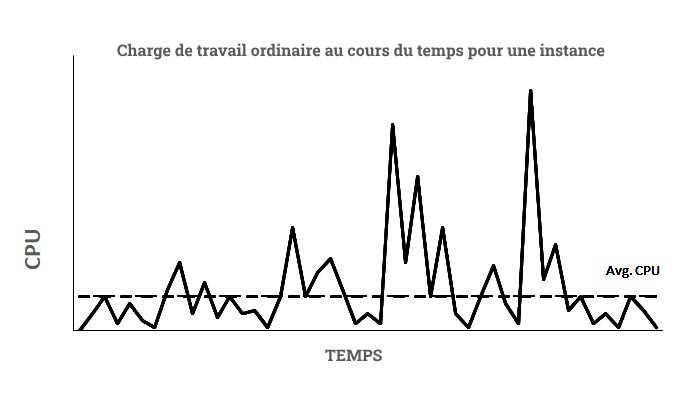
For the vast majority of instances, if you have 1 vCPU, you pay to be able to use 100% of that vCPU. However, AWS realised that in most cases, an EC2 instance does not need to use 100% of the CPU constantly.
It is based on this observation that the instances T appeared. These instances are called "burstable". They allow, with an advantageous rate, to pay for the use of a certain percentage of the CPU (for example 40%). If you consume less, you earn "credits", and if you consume more, you lose "credits". If you reach 0 "credits" and your CPU usage is still above the base percentage, then you pay for the additional usage.
This allows the virtualisation software on the host machine to create many more virtual instances. AWS merely ensures that it can provide each VM with at least the CPU percentage for which it pays. If an instance wants to exceed its usage percentage and use its credits, it can do so if there are remaining computing resources available on the host machine.
Burstable instances are a very good economical option for tasks that on average don't require high performance but occasionally need to support a heavier load, such as testing environments.
This type of instance allows AWS to make savings by providing more instances per host machine; these savings are then passed on to the price of the instances T, which explains the advantageous rate.
To give an idea, here is the baseline percentage you are entitled to for different instance sizes T (these are the same percentages per size for the entire "burstable" range T3, T3a, T4g, T2)
nano 5%
micro 10%
small 20%
medium 20%
large 30%
xlarge 40%
2xlarge 40%
Flex instances
Instances flex are all recent (May 2024) and very similar to burstable instances, but with different assurances.
Flex instances guarantee a base CPU performance of 40% whilst having the ability to scale up to maximum capacity for 95% of the time over a 24-hour period. For the remaining 5% of the time, it may not be possible to exceed 40% of the CPU.
Currently, only the series M7i has a version flex (M7i-Flex), but it's possible that other series will emerge in the future!
Case studies
This is the end of this article; here are some interesting articles to go further!